For those of you who are unfamiliar with Kaleidescape it is a company that offer homes Media Server Solutions. If you go take a look at their website it is AMAZING!!!, BUT it comes with a HUGE price tag like in the tens of thousands.
Within the past year their original design was pretty much shut down by the Gov't due to copyright infringement. So now when you play something from your collection it asks you to put the disk in before it can proceed with playback. Their solution to get around that annoyance is to attach a 100 Disk Bluray changer to the system (I don't even wanna know how much that costs). For all you millionaires this would be a great solution but for all of us normal folk i've got a better idea and it all starts with a Boxee Box.

Boxee Box is essentially a 1080p media extender. It can connect to all media shared on your local network as well as a TON of stuff that is available out there on the web.If you wanna know all that it can do I suggest reading up on their website. For the purposes of this post in comparison to the Kaleidescape as well as the skeptics reading this so far (XBOX 360, Roku, Google TV, PS3 owners, etc). The reason I chose to go with Boxee was its support for MKV file format, as well as the great GUI interface.

The advantage to the MKV format is that is full 1080p video as well as HD audio in one file. For about a year I was using the PS3 to playback AVI video files but the quality drove me nuts. I was told that PS3 media server could transcode MKV files to be able to play them on your PS3 but i could never get it to work and the interface was awful. This was the same situation with Tversity. So now that you know why i chose Boxee we can start getting into the details.
First we need to look at what all is involved with this system. Well the Kaleidescape system would include: Input optical drive, Storage Drives (RAID5), and Media extenders at each location you would like to view at. Right off the bat I can tell you the most expensive part of this system is going to be the storage!! With 1080p video you are going to need a lot of it; each movie takes up anywhere from 20-50GB depending on the movie with most movies averaging about 25GB and avatar coming in right about 40GB. Now I will get into my setup with alternative suggestions.
Kaleidescape Setup Price: A Mid Range Car $?$
Suggested 1 Room Boxee Box Setup:
1. Boxee Box $199
2. Storage:
-External USB Hard Drive (As Big as you are willing to pay for)
-1TB $69
-2TB $109
-ETC
Note: 1TB holds roughly 33 Blurays @30GB per BR
3. Bluray BD-R Drive (doesn't need to write, so not BD-RW)
-Internal for Desktops $49
-External for Laptops $149
Note: PC or Mac Blu-Ray drive is connected to needs to have enough space to rip disc to hard drive
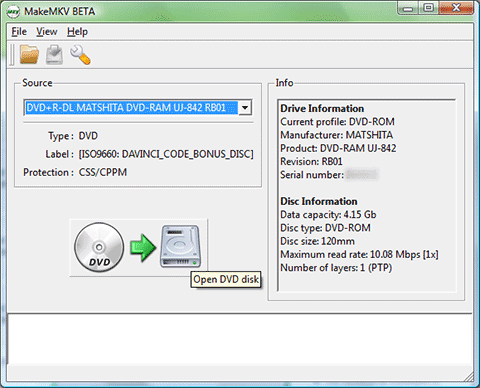
4. MakeMKV Software $FREE (for now while it is in BETA)
Total Cost: ~$300 - 400
Suggested Multi-Room Boxee Box Setup:
1. Boxee Box X # of rooms = $199 X # of rooms
2. Gigabit Network (Hardwired suggested) at least between Server and Boxee Boxes
3.Storage:
-Some sort of Network Area Storage: (Gigabit Connectivity)
-I started off with the D-Link DNS-321 Network Hard Drive Enclosure which supports up to
2x4GB drives and a 2TB Drive
-DNS-321 $95
-Western Digital Green Drive 2TB $99
-There are a ton of NAS solutions out there just make sure you know how to use the one you get.
-My Favorite and I hope to own one someday Drobo FS I'll post a standalone for this one.(Link)
-Instead of the NAS solution I wanted to make an actual server to host my media files with some sort
of back up method. I tried the following unsuccessfully
-UNRAID
-FreeNAS
-Ubuntu w/SAMBA
Note: All of these require significant investment in a new computer if you don't have one laying around.hence the Drobo suggestion
-Eventually I gave up and just installed Windows XP and enabled Network file sharing and it
worked beautifully. The downfall to this is that I have also given up on the backing up of my data.
- This portion of my project is still a work in progress and I am open to any suggestions
or help.
4. Bluray BD-R Drive (doesn't need to write, so not BD-RW)
-External for Laptops $149
Note: The PC or Mac Blu-Ray drive is connected to should have enough space to rip disc to its hard drive5. MakeMKV Software $FREE (for now while it is in BETA)
Total Cost: 2 Room ~$650 - However crazy you wanna get
Setting it All Up:
1. First you will need to set up your storage on your network. (This is another Blog in itself so I won't explain)
2. Install MakeMKV on PC or Mac
3. Install (Internal)/Plugin (External) Bluray player to PC or Mac
Note: Mac will not recognize any Bluray Device, but MakeMKV software will.
4. Follow MakeMKV guide to Rip Blurays to NAS.
Note: The guide doesn't mention this but if you only want the Main Movie portion it is usually the largest title. For Blurays with directors cuts or commentary I suggest picking the largest title first in the list.
Note: I suggest ripping bluray to the PC's Drive first then transferring it to NAS. When ripping directly to NAS you are at the mercy of your network which if it is anything like mine can be pretty hostile. To avoid crappy files just rip to PC or Mac hard drive then transfer to NAS or External USB Hard Drive.
5. Once you get your files into your network somewhere you can use the Boxee Box to add this media to your library. All Files will need to saved with the proper file name:
-Movie: Movie Name (Year)
Movie.Name.(Year)
Movie_Name_(Year)
-TV Shows: Show S01E01 anything after this is extra and doesn't matter
Show.S01E01
Show_S01E01
Once you have all files named properly you can finish adding your source folders and scanning for files. Once the Boxee finds the info from IMDB for your files the will show up in the appropriate locations with IMDB's info and thumbnails.
Here is a quick Video of what it looks like with the thumbnails and info from IMDB
(Sorry for the shakes it was a quick and dirty with the iPhone)