First, I would like to start out by saying thank you for checking out my blog.
Recently I have been contemplating building my own website so that I could share with my friends some of the things I have come across lately that I thought were cool as well as share what is going on in my life. My brother is about to start a blog that will illustrate his journey across the country to school out in Cali and asked for my help. After messing around with his blog I realized that this was all I needed.
I've started out by trying to split my posts into three different categories; Tech, Personal, and Photos. This way it will hopefully stay a little more organized. I have a feeling it will change often but for now it will do.
Got an old generation iPhone laying around? Always wanted a nice universal remote? Well after watching Tekzilla the other day I found out that companies are making IR blasters (remote control signal relay points) that will connect to iPhones via bluetooth.
On the show they reviewed the GEAR4 UnityRemote and it looked pretty cool. I suggest you check it out.
For those of you wanting to jump right to the segment it starts at 14:37 or 4th white dot
I currently use the Harmony 890 Radio Frequency remote and when I went back to get a price for you guys I almost had a heart attack when I saw that it is only $195 now. This is about what I paid for it about 3 years ago since I got it while working at Best Buy at a discount, but the regular price was around $450.
Now knowing that the Harmony only costs $195 that kinda takes a big positive for the iPhone/iPod Touch remotes away but they still have a lot of good stuff for half the price.
If you are not familiar with what the advantages of these remotes are then I'll explain a few.
First and foremost, the ability to turn on/off all devices involved in a specific activity with the click of only one button!! For instance my family has been around technology for years. Between my dad and I we were always getting new gadgets and they were always having to learn how to use new remotes. Well with these remotes you can customize activities like "Watch TV" that will turn on the TV, Receiver, cable box, etc and set them all to the appropriate inputs at the click of a button that is clearly identified on an LCD screen.
Second, a lot of the functionality with remote controls comes from clicking the same button repeatedly until you get to the setting you want. With these remotes and the customizable buttons (LCD screen on Harmony or Custom drag and drop buttons on Unity Remote) you can just select a specific setting you would like to jump to instead of scrolling through all of the options.
One of the first things that comes to mind with using the UnityRemote and the iPhone/Touch app is that there will not only be one remote control...sure if you have an old iPhone or touch lying around you could dedicate it to being the home theater remote but it could also be your phone. I other words there can be unlimited remotes in your house all customized to their specific user.
While Logitech has pretty much got the high end universal remote market captured these new competitors sure peeked my interest.
For those of you who are unfamiliar with Kaleidescape it is a company that offer homes Media Server Solutions. If you go take a look at their website it is AMAZING!!!, BUT it comes with a HUGE price tag like in the tens of thousands.
Within the past year their original design was pretty much shut down by the Gov't due to copyright infringement. So now when you play something from your collection it asks you to put the disk in before it can proceed with playback. Their solution to get around that annoyance is to attach a 100 Disk Bluray changer to the system (I don't even wanna know how much that costs). For all you millionaires this would be a great solution but for all of us normal folk i've got a better idea and it all starts with a Boxee Box.
Boxee Box is essentially a 1080p media extender. It can connect to all media shared on your local network as well as a TON of stuff that is available out there on the web.If you wanna know all that it can do I suggest reading up on their website. For the purposes of this post in comparison to the Kaleidescape as well as the skeptics reading this so far (XBOX 360, Roku, Google TV, PS3 owners, etc). The reason I chose to go with Boxee was its support for MKV file format, as well as the great GUI interface.
The advantage to the MKV format is that is full 1080p video as well as HD audio in one file. For about a year I was using the PS3 to playback AVI video files but the quality drove me nuts. I was told that PS3 media server could transcode MKV files to be able to play them on your PS3 but i could never get it to work and the interface was awful. This was the same situation with Tversity. So now that you know why i chose Boxee we can start getting into the details.
First we need to look at what all is involved with this system. Well the Kaleidescape system would include: Input optical drive, Storage Drives (RAID5), and Media extenders at each location you would like to view at. Right off the bat I can tell you the most expensive part of this system is going to be the storage!! With 1080p video you are going to need a lot of it; each movie takes up anywhere from 20-50GB depending on the movie with most movies averaging about 25GB and avatar coming in right about 40GB. Now I will get into my setup with alternative suggestions.
Kaleidescape Setup Price: A Mid Range Car $?$
Suggested 1 Room Boxee Box Setup:
1. Boxee Box $199
2. Storage:
-External USB Hard Drive (As Big as you are willing to pay for)
-1TB $69
-2TB $109
-ETC
Note: 1TB holds roughly 33 Blurays @30GB per BR
3. Bluray BD-R Drive (doesn't need to write, so not BD-RW)
-Internal for Desktops $49
-External for Laptops $149
Note: PC or Mac Blu-Ray drive is connected to needs to have enough space to rip disc to hard drive
4. MakeMKV Software $FREE (for now while it is in BETA) Total Cost: ~$300 - 400
Suggested Multi-Room Boxee Box Setup:
1. Boxee Box X # of rooms = $199 X # of rooms
2. Gigabit Network (Hardwired suggested) at least between Server and Boxee Boxes
3.Storage:
-Some sort of Network Area Storage: (Gigabit Connectivity)
-I started off with the D-Link DNS-321 Network Hard Drive Enclosure which supports up to
2x4GB drives and a 2TB Drive
-DNS-321 $95
-Western Digital Green Drive 2TB $99
-There are a ton of NAS solutions out there just make sure you know how to use the one you get.
-My Favorite and I hope to own one someday Drobo FS I'll post a standalone for this one.(Link)
-Instead of the NAS solution I wanted to make an actual server to host my media files with some sort
of back up method. I tried the following unsuccessfully
-UNRAID
-FreeNAS
-Ubuntu w/SAMBA
Note: All of these require significant investment in a new computer if you don't have one laying around.hence the Drobo suggestion
-Eventually I gave up and just installed Windows XP and enabled Network file sharing and it
worked beautifully. The downfall to this is that I have also given up on the backing up of my data. - This portion of my project is still a work in progress and I am open to any suggestions or help.
4. Bluray BD-R Drive (doesn't need to write, so not BD-RW)
Note: The PC or Mac Blu-Ray drive is connected to should have enough space to rip disc to its hard drive
5. MakeMKV Software $FREE (for now while it is in BETA) Total Cost: 2 Room ~$650 - However crazy you wanna get
Setting it All Up:
1. First you will need to set up your storage on your network. (This is another Blog in itself so I won't explain)
2. Install MakeMKV on PC or Mac
3. Install (Internal)/Plugin (External) Bluray player to PC or Mac
Note: Mac will not recognize any Bluray Device, but MakeMKV software will.
4. Follow MakeMKV guide to Rip Blurays to NAS.
Note: The guide doesn't mention this but if you only want the Main Movie portion it is usually the largest title. For Blurays with directors cuts or commentary I suggest picking the largest title first in the list.
Note: I suggest ripping bluray to the PC's Drive first then transferring it to NAS. When ripping directly to NAS you are at the mercy of your network which if it is anything like mine can be pretty hostile. To avoid crappy files just rip to PC or Mac hard drive then transfer to NAS or External USB Hard Drive.
5. Once you get your files into your network somewhere you can use the Boxee Box to add this media to your library. All Files will need to saved with the proper file name:
-Movie: Movie Name (Year)
Movie.Name.(Year)
Movie_Name_(Year)
-TV Shows: Show S01E01 anything after this is extra and doesn't matter
Show.S01E01
Show_S01E01
Once you have all files named properly you can finish adding your source folders and scanning for files. Once the Boxee finds the info from IMDB for your files the will show up in the appropriate locations with IMDB's info and thumbnails.
Here is a quick Video of what it looks like with the thumbnails and info from IMDB
(Sorry for the shakes it was a quick and dirty with the iPhone)
This thing is awesome...anyone who understands RAID and other tedious backup methods this thing is a dream. After creating this post I found a better video but I couldn't embed it so here is the link:
This is Cali Lewis from Geekbeat.TV explaining how to use the Drobo (Not the FS but the main differences are Ethernet built in and 5 bays instead of 4)
This is part one of a Homebrew High performance router. This goes over the needed hardware but i will post the second part which is a better software. For those of you thinking uh I can't do this just watch its pretty much just like building a pc only without WINDOWS!!
Once you get past the korny jokes he knows his stuff...
This is part two of a Homebrew High performance router. This goes over the software needed.
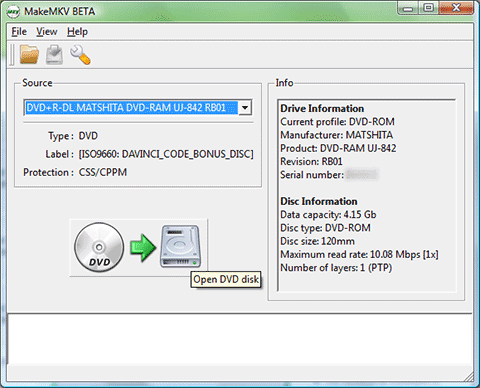
This is great software for anyone with a bluray drive that is looking to back up their movie collection. It allows you to create MKV files which will retain the 1080p video format as well as whichever HD Audio format the disc provides. Right now it is in BETA so it is free, they come out with new releases every month or so to update for copyright stuff when reading the discs. The only problem i have encountered with the problem is the free trail expiring and the new version not being out yet. If you read up on the forums it will explain how to fix it or just ask me if it happens and I can go more in depth.